
7 Prompt Mistakes That Quietly Break Your Vibetrading Strategy
Most vibetrading strategies don't fail because of the market. They fail because of the prompt. Here are seven common mistakes, and how to fix them.

Most vibetrading strategies don't fail because of the market. They fail because of the prompt.
A prompt that looks perfectly reasonable to a human can be read in a completely different way by a model. The model won't complain. It will simply trade on its own interpretation - and you'll only find out when you look at your P/L.
The good news is that most of these failures come from the same handful of mistakes. Here's a non-exhaustive list:
- Using vague thresholds
- Leaving the direction open to interpretation
- Referencing data that your AI can't see
- Defining entries, but not exits
- Skipping the risk section
- Ignoring funding
- Evaluating too often
If you're new to vibetrading, make sure to read our Beginner's Guide To Vibetrading first.
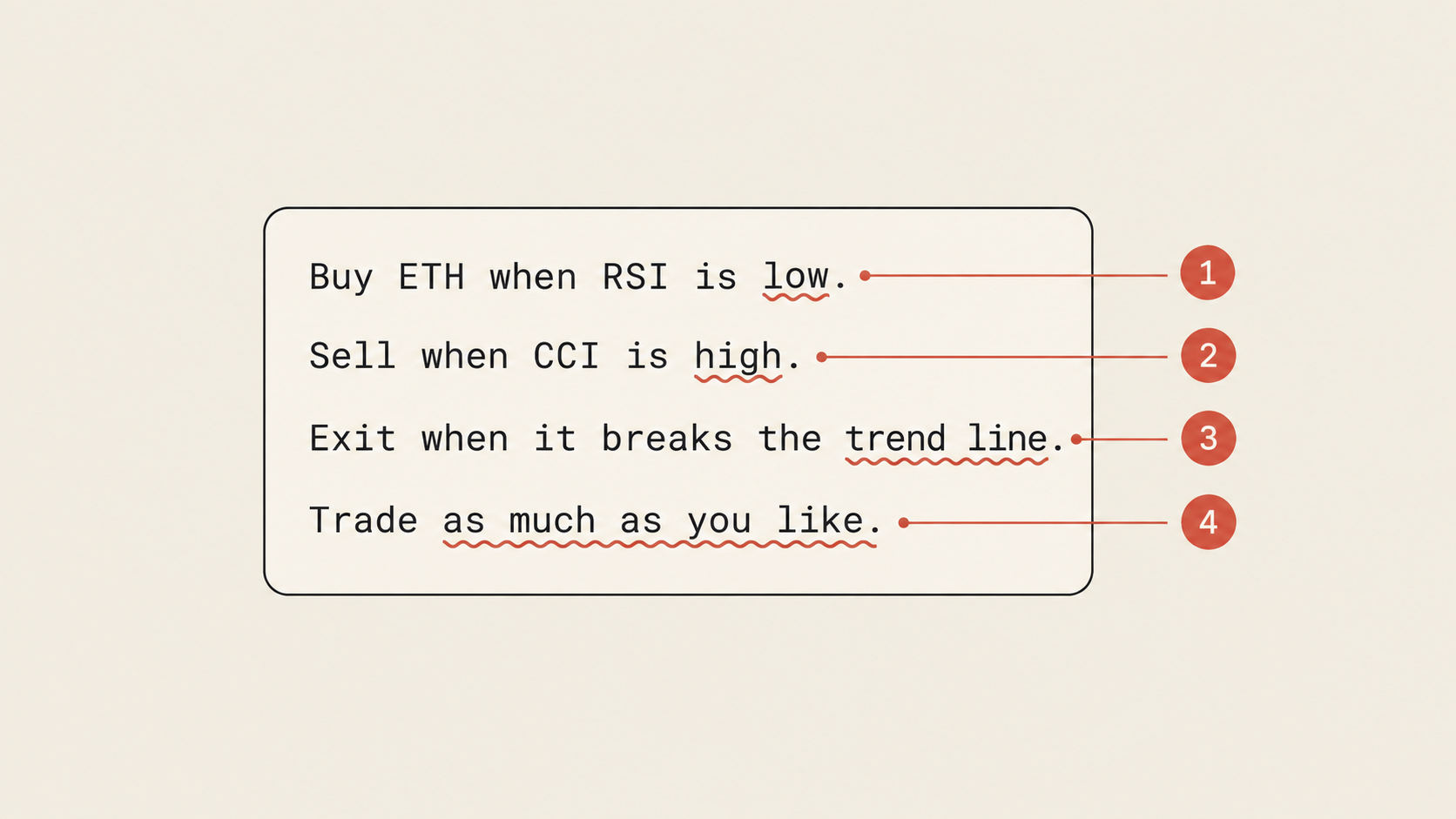
1. Using vague thresholds
What is low? 30? 20? 45?
A human trader would probably assume 30, since that's the textbook oversold level. A model may assume something else entirely - and it may assume something different from one evaluation to the next.
The fix is simple: Use numbers.
This version names the indicator, its period, the timeframe and the exact threshold. There is nothing left for the model to guess.
2. Leaving the direction open to interpretation
We touched on this one in our beginner's guide, but it's worth repeating, since it's one of the most common mistakes we see.
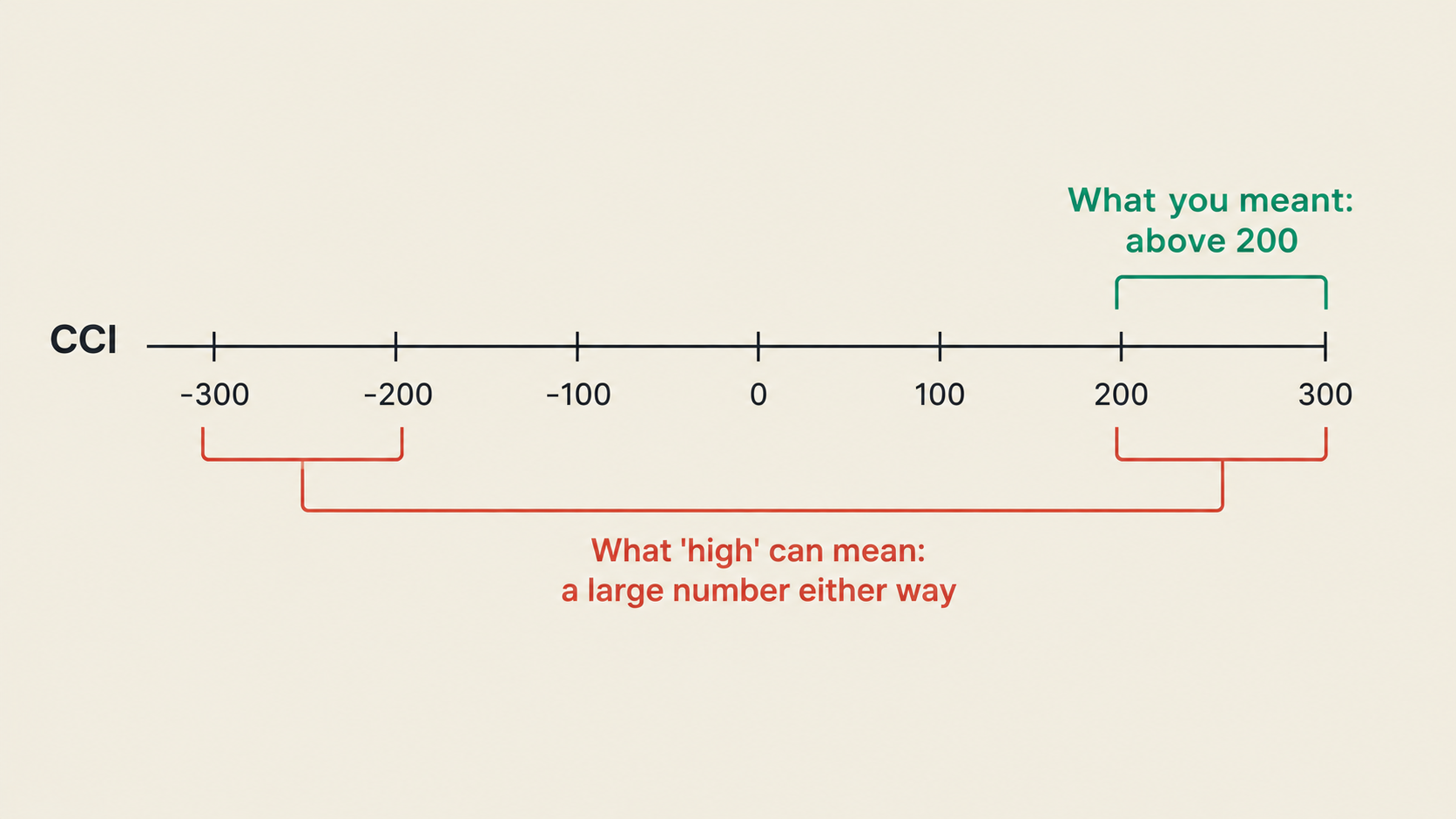
Some models will read "high" in absolute terms. A CCI of 300 is high. But so is a CCI of -300, if you only look at the size of the number. The result is a strategy that sells into strongly overbought and strongly oversold conditions - which is the exact opposite of what you wanted in half of the cases.
The same problem shows up with words like "big move", "strong momentum" and "large spread".
The fix: State the sign and the comparison explicitly.
3. Referencing data that your AI can't see
Your AI can only trade on data that it has access to.
If your prompt says "buy when the price breaks the trend line", and your AI has no way of drawing trend lines, it will do one of two things: Ignore the condition, or make something up. Neither is good.
Common examples of data that models often can't access:
- Trend lines and chart patterns (models work with numbers, not with pictures of charts)
- News and social media
- Indicators or data points that your platform doesn't provide
Before writing your prompt, check the list of supported data. On Everstrike, this includes technical indicators, price data, the best bid and ask (L1 order book data), recent trades, funding and a large catalog of macro and on-chain metrics.
If the data you want isn't on the list, rephrase your condition using data that is. A "trend line break" can often be approximated with a moving average cross, or with the price closing above the highest high of the last X candles.

4. Defining entries, but not exits
This is the vibetrading equivalent of buying a coin and never thinking about when to sell it.
Many first-time prompts spend three paragraphs on the entry and a single sentence (or nothing at all) on the exit. The model will then open positions just fine - and have no idea what to do with them afterwards.
A good exit section answers three questions:
- When do I take profit? (a fixed target, or a condition such as the price returning to the mean)
- When do I cut the loss? (a stop-loss, or a condition that invalidates the trade)
- What happens if neither occurs? (for example, close the position after X candles)
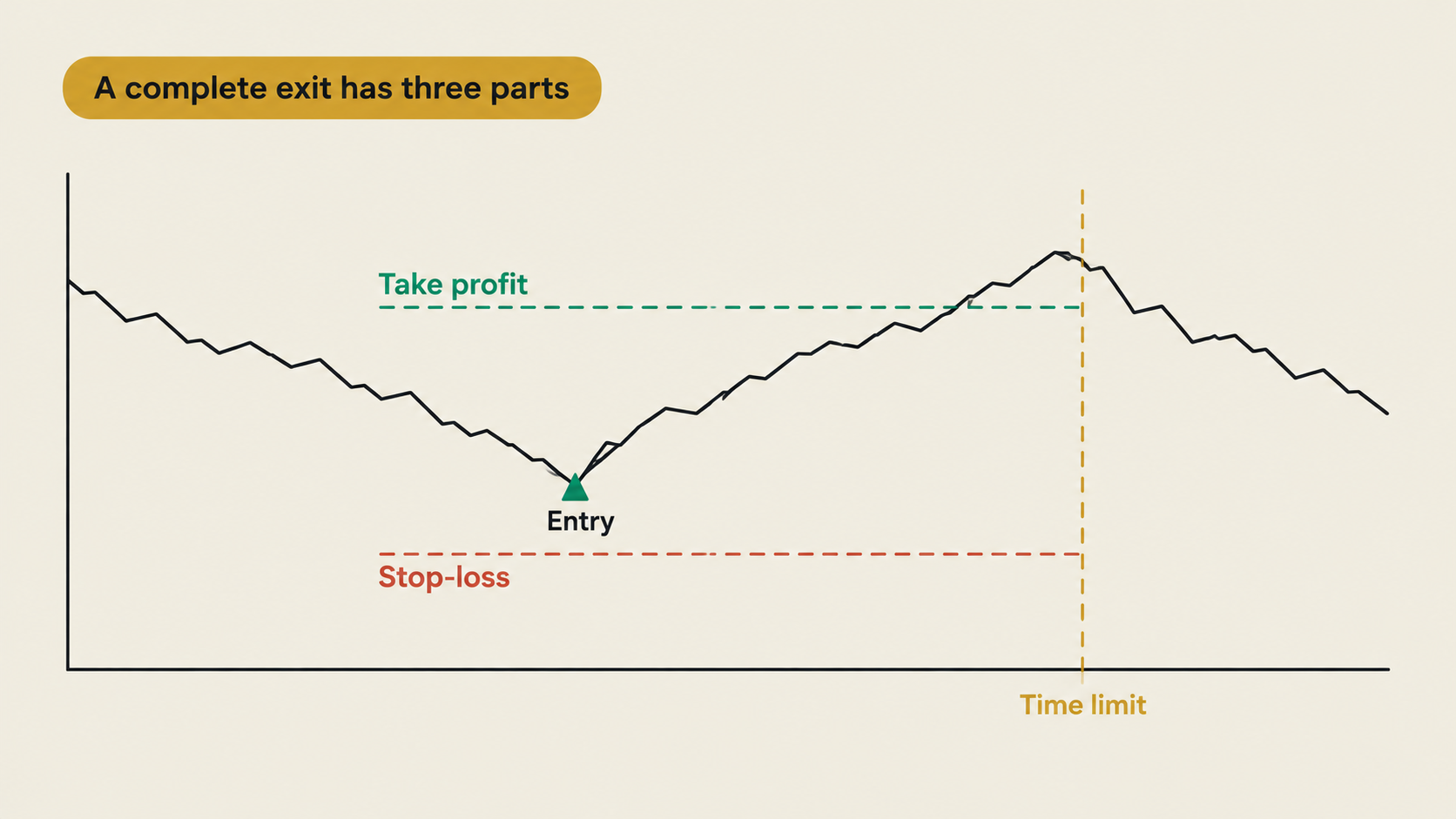
In our fade the spikes strategy, the exit logic was a single line - "Exit at a 0.05% profit, or when the price is below EMA (20)" - but it covered both the profit target and the invalidation.
5. Skipping the risk section
Without a risk section, your AI decides how much to trade.
That may be fine when everything goes well. It's not fine when the model misreads a condition and keeps adding to a losing position.
At a minimum, your prompt should include:
- A maximum position size
- A maximum order size
- A no-trade condition (for example: no new entries after a loss of X% in a day)
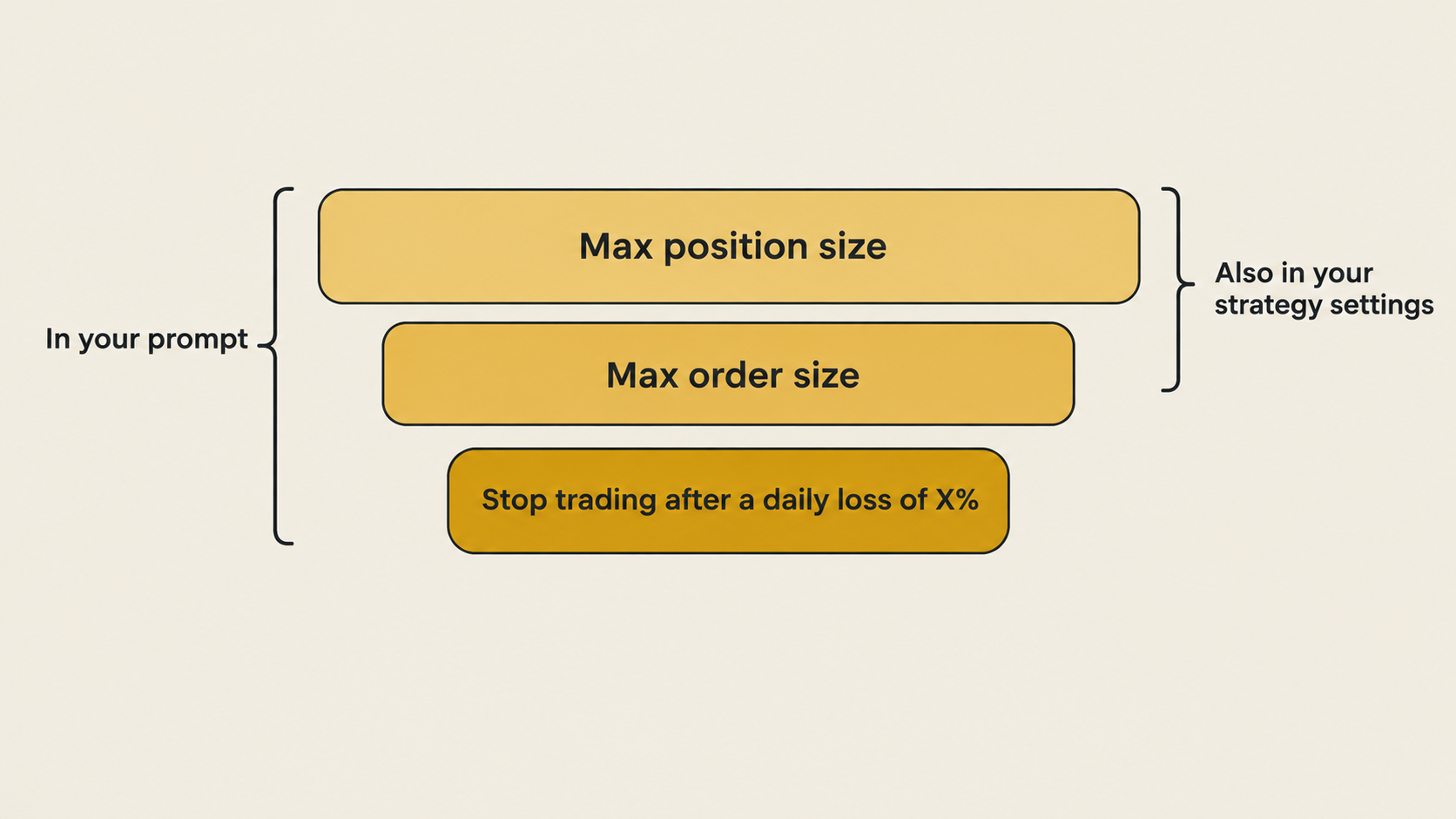
You can also enforce some of these outside the prompt. A fixed order quantity prevents the model from controlling trade size at all, and a high minimum confidence threshold (90% is the default on Everstrike) filters out most low-quality decisions.
6. Ignoring funding
If you're trading perpetual futures, funding is part of your P/L. It's paid every hour, and it can be either a cost or an income.
A prompt that ignores funding can look great on paper and still bleed money in practice - especially if it holds positions for a long time, or always takes the crowded side of the market.
The fix is to make funding part of your logic:
- As an entry filter: "Do not open new longs if the funding rate is above 0.01% per hour."
- As an exit condition: "Close the position if the funding rate turns against it."
- As the strategy itself: Strategies like the funding carry are built entirely around it.

If you're trading perpetual options, this matters even more. Funding rates on perpetual options are often much higher than on perpetual futures, and they are often what makes or breaks a strategy.
7. Evaluating too often
Every evaluation costs money. On Everstrike, the default model (GPT-6 Luna) costs $0.0005 per check, plus $0.0005 for every market the strategy covers. For a strategy that trades a single market, that's $0.001 per evaluation.
That sounds like nothing - until you multiply it:
- Every hour: about $0.02 per day
- Every 5 minutes: about $0.29 per day
- Every minute: about $1.44 per day
- Every 30 seconds: about $2.88 per day
A strategy that trades the 4h timeframe gains almost nothing from being evaluated every 30 seconds. The candles it reads only change every four hours. Match the evaluation frequency to the timeframe of your strategy, and only go faster when your logic actually needs it (for example, a scalping strategy on the 5m timeframe).
The same goes for the number of markets. A strategy that trades ten markets costs $0.0055 per evaluation - 5.5 times as much as a single-market strategy. Add markets once the strategy has proven itself, not before.

Bonus: Not testing before going live
Even a perfectly written prompt can contain a bad idea.
Before going live, backtest the rules in the Strategy Builder, and test across several markets and timeframes. A strategy that only works on a single market and a single timeframe is often fitted too closely to the past.
When you do go live, start small, and read the reasoning behind your AI's decisions. Every decision on Everstrike comes with a written reason and a confidence score - the fastest way to find out whether your AI understood your prompt the way you intended.
Wrapping up
Most broken vibetrading strategies have a broken prompt behind them. The seven most common mistakes are:
- Vague thresholds - use numbers.
- Ambiguous direction - state the sign and the comparison.
- Unavailable data - check the supported data list.
- Missing exits - define take-profit, stop-loss and a time limit.
- No risk section - cap order size and position size.
- Ignoring funding - make it an entry filter or an exit condition.
- Evaluating too often - match the frequency to your timeframe.
Fix these, and your AI will trade the strategy you actually wrote - not its own interpretation of it.
Try vibetrading directly in your browser (no signup needed).